
Due to network restrictions, running
docker pull ghcr.iodirectly on the server can fail. Below, we solve this by packaging the Docker image into a tarball in GitHub Actions and syncing it to the server via SCP.
Core Concept Overview
| Concept | Technical Essence | Primary Role | Belongs To |
|---|---|---|---|
| Tag | Git Lightweight Tag | Marks a specific commit in the repo (e.g. git tag v1.0.0) | Native Git |
| Release | GitHub Enhanced Release Management | Packages a distributable version from a Tag (notes/binaries) | GitHub Platform |
| Actions | GitHub CI/CD Engine | Automates build, test, and deployment via Workflows | GitHub Service |
Create Repository Secrets / Variables
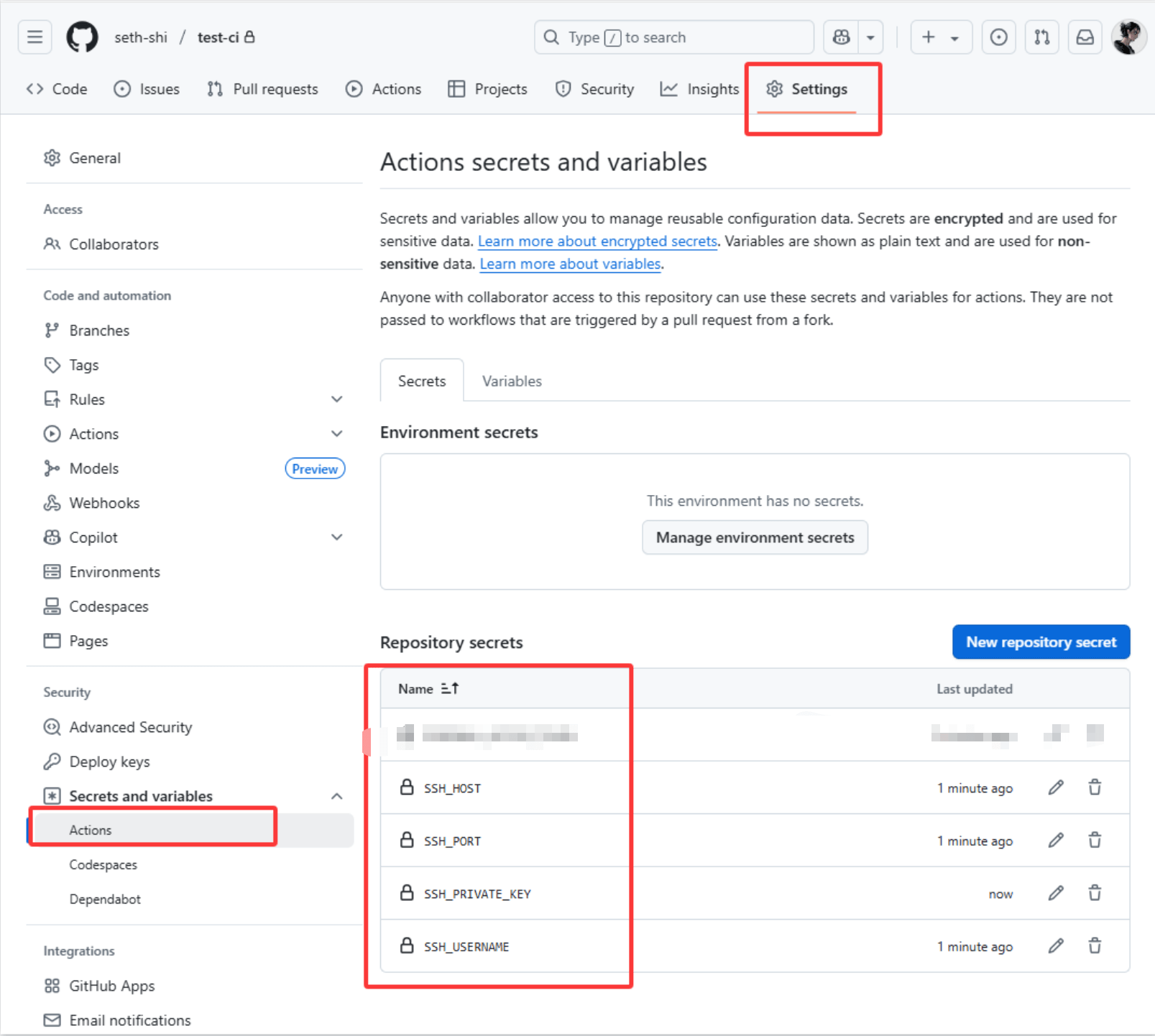
Write the Workflow File
# tree
├─.github
│  └─workflows
│      └─deploy.yml
├─Dockerfile
## .github/workflows/deploy.yml
name: deploy

on:
  push:
    branches: ['main']

env:
  REGISTRY: ghcr.io
  IMAGE_NAME: ${{ github.repository }}
  IMAGE_TAG: ${{ github.run_id }}
  IMAGE_FULL_NAME: ghcr.io/${{ github.repository }}:${{ github.run_id }}
  # !!! Container name
  CONTAINER_NAME: test-ci
  # Saved image archive filename
  IMAGE_FILE: ${{ github.run_id }}.tar

jobs:
  build:

    runs-on: ubuntu-latest
    permissions:
      contents: read
      packages: write
      # This is used to complete the identity challenge
      # with sigstore/fulcio when running outside of PRs.
      id-token: write

    steps:

      - name: Checkout repository
        uses: actions/checkout@v4

      - name: Set up Docker Buildx
        uses: docker/setup-buildx-action@v3.0.0

      - name: Log in to registry
        uses: docker/login-action@v3.0.0
        with:
          registry: ${{ env.REGISTRY }}
          username: ${{ github.actor }}
          password: ${{ secrets.GITHUB_TOKEN }}

      - name: Extract Docker metadata
        id: meta
        uses: docker/metadata-action@v5.0.0
        with:
          images: ${{ env.REGISTRY }}/${{ env.IMAGE_NAME }}

      - name: Build Docker image
        id: build-and-push
        uses: docker/build-push-action@v5.0.0
        with:
          context: .
          ## Because the server cannot reliably docker pull from ghcr.io, load locally and sync via SCP
          push: false
          load: true
          tags: ${{ env.REGISTRY }}/${{ env.IMAGE_NAME }}:${{ env.IMAGE_TAG }}
          labels: ${{ steps.meta.outputs.labels }}
          cache-from: type=gha
          cache-to: type=gha,mode=max
      - name: Save image to tar archive
        run: |
          docker save -o ${{ env.IMAGE_FILE }} ${{ env.IMAGE_FULL_NAME }}
          du -sh ${{ env.IMAGE_FILE }}

      - name: Sync image archive to server
        uses: appleboy/scp-action@v1
        with:
          host: ${{ secrets.SSH_HOST }}
          username: ${{ secrets.SSH_USERNAME }}
          key: ${{ secrets.SSH_PRIVATE_KEY }}
          port: ${{ secrets.SSH_PORT }}
          source: ${{ env.IMAGE_FILE }}
          target: /tmp/

      - name: Deploy over SSH
        uses: appleboy/ssh-action@v1
        with:
          host: ${{ secrets.SSH_HOST }}
          username: ${{ secrets.SSH_USERNAME }}
          key: ${{ secrets.SSH_PRIVATE_KEY }}
          port: ${{ secrets.SSH_PORT }}
          script: |
            # Load Docker image
            echo ${{ env.CONTAINER_NAME }}
            echo ${{ env.IMAGE_FULL_NAME }}
            docker load -i /tmp/${{ env.IMAGE_FILE }}
            # Clean up old container
            docker stop ${{ env.CONTAINER_NAME }} &>/dev/null || true
            docker rm -f ${{ env.CONTAINER_NAME }} &>/dev/null || true
            ## Start container
            docker run --name ${{ env.CONTAINER_NAME }} --restart=always ${{ env.IMAGE_FULL_NAME }}
            # Clean up temporary file
            rm /tmp/${{ env.IMAGE_FILE }}
            echo "Deployment completed successfully!"